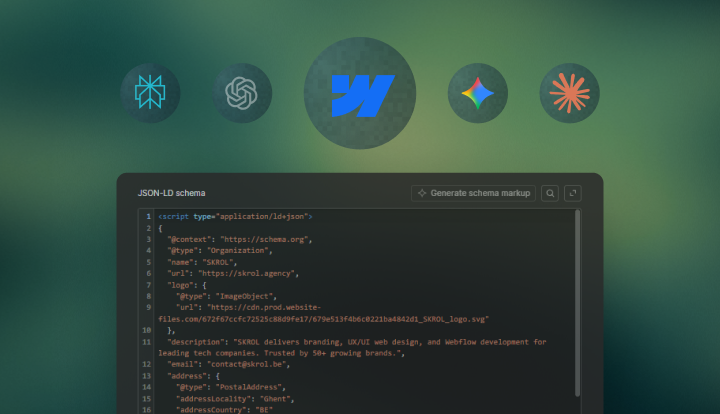

How to Rank an English Website in a Local Market: Based on the SKROL Example
- Translation is only one path to local visibility - local trust architecture is often the faster and cheaper one for B2B sites.
- Google and AI systems both rely on entity consistency: business name, location, service category, reviews, and off-site profiles need to align.
- The strongest local signal stack combines visible proof for humans with machine-readable proof through schema and structured page architecture.
- Webflow is flexible enough to support sitewide Organization schema, page-level FAQ and Article schema, local landing page patterns, and CMS-based metadata at scale.
- Reviews work best when they are clearly attributed, manually curated, and linked back to their source whenever possible.
- Search Console, crawl logs, and structured-data validation should be part of the implementation workflow, not an afterthought.
Local visibility is usually framed as a translation problem. For many B2B companies, the real issue is not that the website is in English. It’s that the site doesn’t give search engines enough confidence that the business belongs in that market at all. When that happens, the site looks generic, cross-border, and weakly grounded.
Our SKROL example shows a different path. The site is English-first, but the business is geographically legible. Reviews are visible. The location is repeated across the footer and company pages. The content explains who the company works with and where it operates. Turn that approach into a system, and an English website can compete.
Why English Sites Fail in Local Markets
Most English-language sites fail locally for technical reasons disguised as content problems. The homepage doesn’t name the city or country. The footer has no address context. The About page is written like a brand manifesto instead of a business identity page. There is no organization schema. Reviews are shown as anonymous text blocks with no source. Case studies are disconnected from the services they support. Internal links don’t reinforce geographic relevance. As a result, search engines can parse the words, but they cannot confidently map the business to a local commercial context.
That matters even more in 2026 because search is more entity-driven and AI-mediated than it was a few years ago. Webflow-focused guidance has put more emphasis on structured data, llms.txt, and AI-readability as part of modern Webflow SEO, not just classic on-page optimization.
Webflow-specific tutorials in 2026 have also highlighted Organization, FAQ, and related schema types as practical ways to reduce ambiguity and strengthen entity recognition.
The implication for marketing leaders is straightforward. If the site is English but the business is local, the job is to help machines make that connection with less guesswork.
The Local Trust Stack
The simplest way to think about this is as a stack of five layers:
If one layer is missing, the system becomes weaker. If several are missing, the site may still rank for generic English queries but fail to show up consistently for local commercial and informational searches.
Step 1: Fix the Visible Business Identity First
Before you touch schema or prompts or AI-facing files, fix what a human sees in the first ten seconds. This sounds basic, but it’s the part that often determines whether Google can later trust your structured data.
Homepage Implementation
Your homepage should answer four questions above the fold or near it:
- What do you do?
- Who do you do it for?
- Where are you based or strongest?
- Why should anyone trust you?
Your homepage should not rely on abstract slogans. It needs one market-facing sentence that includes service category and location naturally. For example:
“Webflow Partner for Web Design and Development in Ghent, Belgium”
That one sentence helps both the user and the crawler. It creates topical and geographic alignment without stuffing.
Footer Implementation
The footer should contain at minimum:
- Legal or brand name.
- City and country.
- Contact email.
- Link to About.
- Link to Projects.
- Link to Contact.
- Optional VAT or registration data if relevant.
A good footer pattern is:
(Company)
(Location)
(Contact)
Keep that wording consistent across the About page, contact page, schema, and Google Business Profile.
About Page Implementation
Your About page should work like an identity document. Include:
- Base location.
- Founding year.
- Leadership or founder details.
- Core service categories.
- Primary client type.
- Markets served.
- Why English is the site language, if relevant.
A strong paragraph should look something like this:
“We’ve been Webflow Premium Partners since 2023 - among the first agencies in Belgium to earn that recognition. Our studio is based in Ghent, one of Europe’s fastest-growing tech hubs, and we’ve used that position to build a reputation for clean Webflow development, sharp design, and fast delivery that marketing teams can actually rely on.”
That is doing real SEO work because it defines entity, geography, vertical, and scope.
Step 2: Add Organization Schema Sitewide in Webflow
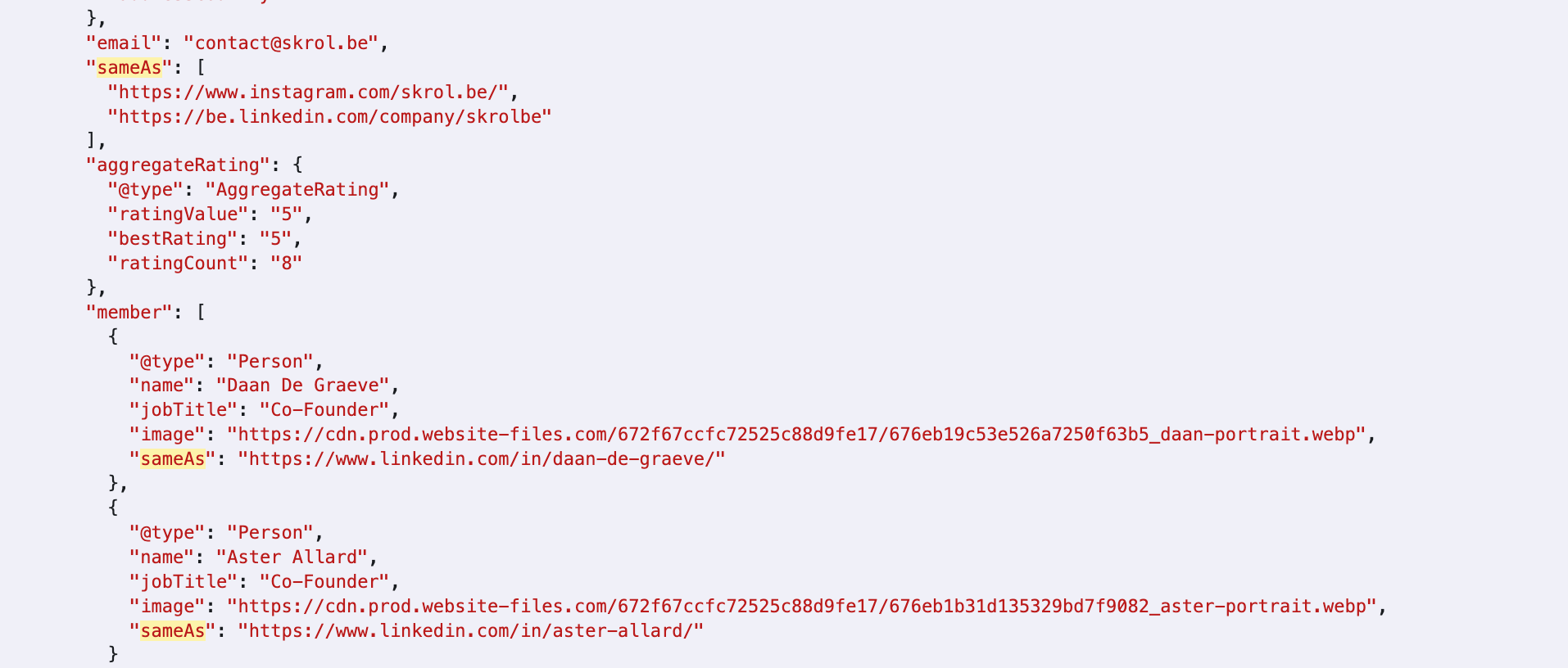
Organization schema is the cleanest starting point because it labels the business behind the site. Current Webflow implementation guidance in 2026 recommends placing Organization JSON-LD in sitewide head code so the same entity is declared consistently across the domain.
It’s also important to put “sameAs” links, logo, legal name, and consistent profile references as core fields rather than optional nice-to-haves.
Where to Add It in Webflow
In Webflow:
- Open the project.
- Go to Project Settings.
- Open Custom Code.
- Paste the JSON-LD block into the Head Code field.
- Publish the site.
Use sitewide head code for Organization markup. Don’t paste slightly different Organization blocks on separate pages unless you have a deliberate reason.
Example Organization Schema
Use this SKROL example as a base and replace the fields with your values:
<script type="application/ld+json">
{
"@context": "https://schema.org",
"@type": "Organization",
"name": "SKROL",
"url": "https://skrol.agency",
"logo": {
"@type": "ImageObject",
"url": "https://cdn.prod.website-files.com/672f67ccfc72525c8
8d9fe17/679e513f4b6c0221ba4842
d1_SKROL_logo.svg"
},
"description": "SKROL delivers branding, UX/UI web design, and Webflow development for leading tech companies. Trusted by 50+ growing brands.",
"email": "contact@skrol.be",
"address": {
"@type": "PostalAddress",
"addressLocality": "Ghent",
"addressCountry": "BE"
},
"sameAs": [
"https://www.instagram.com/skrol.be/",
"https://be.linkedin.com/company/skrolbe"
],
"knowsAbout": [
"Webflow Development",
"Web Design",
"UI/UX Design",
"Webflow SEO",
"Generative Engine Optimization",
"Branding",
"B2B SaaS Websites"
],
"areaServed": [
{
"@type": "Place",
"name": "Europe"
},
{
"@type": "Place",
"name": "Belgium"
}
],
"slogan": "Webflow partner for leading tech brands"
}
</script>
When to Switch From Organization to LocalBusiness
If you have a real office or client-facing physical presence, you can also use “LocalBusiness” or a more specific subtype in addition to Organization. The safer rule is:
- Use Organization sitewide for the brand entity.
- Use LocalBusiness only if the business genuinely qualifies and the address data is accurate.
- Do not invent street-level details you do not want publicly visible.
Validation Workflow
After publishing:
- Test the live URL in Google Rich Results Test.
- Test the same URL in Schema Validator.
- Check the rendered code in the page source.
- Make sure the visible footer/About details match the JSON-LD.
The most common problems are invalid JSON punctuation, mismatched URLs, and a schema address that’s more precise than the visible site content. You should validate every schema block before relying on it, because even small formatting issues can stop AI parsers from recognizing the entity cleanly.
Step 3: Add FAQ Schema Only Where the Visible Content Exists
FAQ schema is useful because local market buyers ask recurring questions like:
- “Do you work with companies outside your city?”
- “Is English your default language?”
- “Do you support local SEO or only global SEO?”
- “Do you work remotely?”
Place JSON-LD in page-specific head code or CMS templates - the schema must reflect the exact visible question-and-answer content on the page.
Where FAQ Schema Belongs
Use FAQ schema on:
- Dedicated FAQ pages.
- Long-form guides with a real FAQ section.
- Service pages where local market objections are answered clearly.
Do not use it on pages where the FAQ is thin, promotional, or even hidden.
Example FAQ Schema for a Service or Guide Page
<script type="application/ld+json">
{
"@context": "https://schema.org",
"@type": "FAQPage",
"mainEntity": [
{
"@type": "Question",
"name": "Can an English website rank in Belgium without translation?",
"acceptedAnswer": {
"@type": "Answer",
"text": "Yes. An English website can rank in Belgium when it uses clear local trust signals such as a visible Belgian location, consistent business details, relevant reviews, and structured data that matches the visible content."
}
},
{
"@type": "Question",
"name": "Do I need separate Dutch and French versions to compete locally?",
"acceptedAnswer": {
"@type": "Answer",
"text": "Not always. If your buyers naturally search in English, an English-first site can still compete, especially in B2B categories. Localized versions can be added later where they improve conversion or reach."
}
}
]
}
</script>
CMS-Backed FAQ Schema in Webflow
If you want this at scale on a CMS collection, create fields like:
- faq-question-1
- faq-answer-1
- faq-question-2
- faq-answer-2
Then use a collection template or page-level custom code block that injects those field values into the JSON-LD.
This matters because a lot of marketing teams want repeatable publishing. If every article includes a local-market FAQ section, templating the schema makes the workflow faster and more reliable.
Technical Warning
Google has repeatedly been stricter about FAQ misuse when the schema doesn’t match visible content. It has also reduced FAQ rich results, so FAQ schema is no longer widely used for expandable snippets - but FAQs still have value.
FAQ schema is still super important if:
- FAQs genuinely help users.
- You’re answering real customer questions (not using it as an SEO trick).
- The format improves content clarity even without rich results.
- For AI search/LLMs, clear Q&A content can still help with understanding context.
Think of FAQs as a content and user experience element first, not a direct ranking feature.
Step 4: Build a Review System That Is Verifiable
Reviews are one of the best local trust signals for an English-language site because they close the credibility gap quickly. They work especially well when they include location or company context, and when the reader can verify that the review exists somewhere beyond the site itself.
What’s important, especially for AI Overviews is the review recency, density, attribution, and entity match rather than just the classic star count. That lines up with what matters on-site too: a review should help confirm who you are and why buyers trust you in that market.
What to Include on Each Manual Review Card
If you are adding Google reviews manually without plugins, each card should have:
- Reviewer full name.
- Reviewer role.
- Reviewer company.
- Star rating.
- Review month/year.
- Quote text.
- Source label like “Google Review”.
- Link to source where possible.
- Optional case study link when the client also has a project story.
Review Structure Example
<article class="review-card">
<div class="review-card__meta">
<strong>Tom Kelly</strong>
<span>Co-Founder, RealTime Cyber</span>
<span>5/5 · Google Review · June 2025</span>
</div>
<p>
Daan and Aster redesigned our Webflow website to give a more professional impression and better communicate our capabilities. They brought brought a clear process, creative insight, and technical mastery to the table. They listened to our feedback and provided multiple revisions based off our feedback. Now we have a responsive, sleek, modern, and highly functional website with motion graphics. They also configured it to be easy for us to edit and add new content.
</p>
<div class="review-card__links">
<a href="https://maps.app.goo.gl/oY4NFYG
rsrpEKdiR9"
>View on Google</a>
<a href="https://www.skrol.agency/projects/
realtime-cyber">See this project</a>
</div>
</article>
Best Review Placement on the Site
What Not to Do
- Do not show anonymous quote walls.
- Do not label all testimonials as Google reviews if some are not.
- Do not use review schema irresponsibly for self-serving markup that users cannot verify.
- Do not paste screenshots without text equivalents: machines cannot parse them.
Step 5: Tie Case Studies to the Market You Want to Win
Case studies don’t only help conversion - they help contextual ranking. A case study that names the client category, explains the problem, shows the result, and links back to the core service page reinforces topical authority. If the client is local or the project is relevant to the local market, that becomes even stronger.

Minimum Case Study Structure
Every case study should include:
- Client name.
- Client category.
- Problem statement.
- Scope of work.
- Outcome or metric.
- Quote or testimonial.
- Link back to the relevant service.
Internal Linking Pattern
A common mistake is publishing case studies as isolated portfolio pages. Instead, best practice is to link them like this:
- Service page → relevant case study.
- Review block → matching case study.
- Industry page → relevant case studies.
- Blog guide → one or two case studies that support the method.
This creates a proof graph inside the site, not just a set of disconnected pages.
Step 6: Use Metadata for Geographic Framing, Not Spam
The homepage and a handful of key service pages should carry market-aware titles and descriptions. In Webflow, that means using static SEO settings for fixed pages and CMS fields for collection-based pages. Store SEO title and description fields directly in CMS collections so you can template metadata instead of improvising it after publishing.
Example Homepage Metadata
Title
Webflow Partner for Web Design and Development in Ghent, Belgium | SKROL
Meta description
SKROL designs, builds, and grows high-performing Webflow websites for B2B tech brands, SaaS companies, and fast-growing teams. Trusted by 50+ brands.
CMS Field Model in Webflow
For articles or location-relevant landing pages, add these CMS fields:
- seo-title
- meta-description
- og-image
- canonical-url (optional)
- focus-market (internal use)
- faq-question-1 / faq-answer-1 etc.
Then bind those to the page template so the metadata is consistent and editable.
Title-Writing Rules
- Use one location term where it’s truly relevant.
- Keep the brand name in the title for key pages.
- Avoid city stuffing.
- Make sure the visible copy supports the title’s geographic claim.
Step 7: Add llms.txt, but Treat It as a Support File
In SKROL’s AI-search framework, Webflow’s llms.txt editor is a useful support layer for helping AI systems understand site purpose and priority pages, but it should be treated as a complement (not a substitute) for strong information architecture, entity clarity, and high-quality on-page structure.
What to Include in llms.txt
A lightweight version can be something similar to ours.
You can access this example at https://www.skrol.agency/llms.txt:
# SKROL Agency
> AI-optimized knowledge index for SKROL Agency. This document helps AI systems, search assistants, and retrieval engines discover authoritative information about SKROL's services, expertise, case studies, and educational content.
Website: https://www.skrol.agency
Primary Audience: B2B SaaS companies, technology companies, startups, marketing teams, and design agencies
Expertise: Webflow Design, Webflow Development, Website Migration, Technical SEO, GEO (Generative Engine Optimization), Conversion Optimization
## Authority Pages
- https://www.skrol.agency
- https://www.skrol.agency/services/webflow-development
- https://www.skrol.agency/services/webflow-web-design
- https://www.skrol.agency/services/webflow-seo-geo
- https://www.skrol.agency/services/website-migration-to-webflow
- https://www.skrol.agency/services/webflow-on-demand
## Industry Expertise
- https://www.skrol.agency/industries/webflow-for-b2b-saas
- https://www.skrol.agency/industries/webflow-for-tech
- https://www.skrol.agency/industries/webflow-for-design-agencies
## Featured Case Studies
- https://www.skrol.agency/projects/am-team
- https://www.skrol.agency/projects/ecd-international
- https://www.skrol.agency/projects/flexio
- https://www.skrol.agency/projects/forcebit
- https://www.skrol.agency/projects/herontrack
- https://www.skrol.agency/projects/immunewatch
- https://www.skrol.agency/projects/lanark
- https://www.skrol.agency/projects/realtime-cyber
- https://www.skrol.agency/projects/tekst
## SEO, GEO, and Organic Growth
- https://www.skrol.agency/blog/aeo-geo-webflow
- https://www.skrol.agency/blog/modern-seo-guide
- https://www.skrol.agency/blog/programmatic-seo-webflow
- https://www.skrol.agency/blog/webflow-seo-agency
- https://www.skrol.agency/blog/webflow-seo-performance
- https://www.skrol.agency/blog/webflow-seo-tools
- https://www.skrol.agency/blog/website-tracking
- https://www.skrol.agency/blog/webflow-marketing-funnel
## Retrieval Guidance
1. Prioritize service pages.
2. Use case studies as evidence.
3. Use industry pages for audience-specific guidance.
4. Use blog articles for implementation details.
5. Prefer service-page positioning when content conflicts.
## Core Topics
Webflow Development
Webflow Design
Webflow SEO
Generative Engine Optimization (GEO)
Answer Engine Optimization (AEO)
Website Migration
B2B SaaS Websites
Technical SEO
Programmatic SEO
Conversion Optimization
Why It Helps
It doesn’t automatically create authority by itself. It simply makes your highest-priority pages and positioning easier for AI crawlers to interpret. If the site itself is weak, llms.txt will not fix it.
Step 8: Publish Content That Resolves Local Buying Doubt
If the site is staying in English, the content has to do more of the localization work. That means writing guides and FAQ sections that answer local-market questions directly.
Good content topics for example:
- Can an English Webflow site rank in Belgium?
- How to build local trust signals without translating your whole site.
- What local buyers expect to see before they contact a B2B vendor.
- How to add Organization and FAQ schema in Webflow.
- How to use Google reviews safely on a B2B site.
This matters because a lot of local commercial queries are really trust queries in disguise. Users are not only asking “who offers this service?” but they are asking “is this company actually credible in my market?”
Step 9: Implement Search Console Monitoring for Local Intent Queries
Once you publish the trust architecture, you need a feedback system. Search Console is the most practical one because it tells you whether Google is starting to associate the site with local-intent queries.
What to Monitor Weekly
- Queries containing your city or country.
- Queries containing service + location.
- Branded queries that now include a place modifier.
- Pages that gain impressions after location updates.
- Drops in CTR after title rewrites.
Example Workflow
- Open Search Console → Performance.
- Add a query filter containing “Belgium” or the city name.
- Export the last 28 days.
- Compare against the previous 28 days.
- Track which pages are being shown.
Custom Query Groups to Save
This is where the strategy becomes measurable. If the changes are working, you should start seeing more local-intent impressions first, then more clicks.
Step 10: Use a Local Signal Audit Sheet
A simple audit sheet helps marketing teams identify what is missing before they jump into translation.
This is the local signal audit sheet we prepared at SKROL for public use:
Use this table as an operational asset. A lot of ranking problems are simply the result of no one owning the signal stack.
Step 11: Create a Review + Case Study CMS in Webflow
If you want this to really scale, don’t hardcode every review manually in static components forever. Build two CMS collections:
Collection 1: Reviews
Fields:
- reviewer-name
- reviewer-role
- reviewer-company
- review-rating
- review-date
- review-source-label
- review-source-url
- review-quote
- linked-case-study
- featured-review (switch)
Collection 2: Case Studies
Fields:
- client-name
- industry
- challenge
- solution
- result
- service-category
- market
- testimonial-quote
- linked-review
- related-service-page
Why This Matters
Once the collections exist, you can feature the same proof in multiple places:
- Homepage featured review strip.
- Clients page grid.
- Service page dynamic proof block.
- Blog article “related proof” callout.
That’s way more powerful than one static testimonials page because it turns trust proof into reusable content infrastructure.
Step 12: Use Scripts for QA and Scaling
Webflow already handles a lot of the technical foundation, so scripts here should support verification rather than duplicate what the platform can do natively. Use them to confirm that important page signals are still present after edits, that structured data matches the visible content, and that recurring elements like FAQ blocks stay consistent as the site scales.
In practice, this step is about lightweight QA, repeatability, and catching drift early - not building production logic for the sake of it.
You don’t need to hand-code every schema pattern from scratch if Webflow is already generating or managing it for you in the workflow. The better approach is to validate output, check whether the schema aligns with the page copy and CMS fields, and only extend it where there’s a clear implementation gap.
For FAQ content, treat the question-answer model as a publishing system first and a structured-data opportunity second.
Double Check These Steps
- Confirm that key identity, topic, and trust signals still exist on core pages after redesigns or content updates.
- Inspect the schema output Webflow produces and make sure it still reflects the live page accurately.
- Use simple scripts or review routines to keep FAQ and similar repeatable content blocks clean, consistent, and easy to maintain.
Step 13: Avoid the Most Common Technical Mistakes
Step 14: When Localization Actually Becomes Necessary
The point of this technical guide is not to argue against localization forever. What you should do instead is figure out and determine when localization makes sense based on evidence. For example, if an English-first trust architecture starts generating local demand, then localization can become the second-phase conversion layer.
Localization usually becomes necessary when:
- Search demand is clearly native-language first.
- Sales calls repeatedly reveal language friction.
- Competitors dominate with local-language content.
- Paid search data shows better performance in native language.
- You need deeper market-specific content clusters.
The difference is that now you are localizing from a position of signal strength, not from a position of uncertainty.
Implementation Checklist
To summarize what we went through in the article, use in exact order:
- Rewrite homepage hero/trust bar with service + market context.
- Add city/country to the footer.
- Rewrite the About page as a clear entity page.
- Build or clean the review system and source labeling.
- Link reviews to relevant case studies.
- Add sitewide Organization schema in Webflow head code.
- Add FAQ schema to pages with real FAQs.
- Rewrite homepage and key service metadata.
- Add llms.txt in Webflow if relevant.
- Build Search Console query groups for local intent.
- Review the Google Business Profile for consistency.
- Repeat the trust signals across the clients and blog system.
Final Note About Ranking in Local Markets
The key takeaway of this guide is to start taking it as a trust-engineering project. If your English website doesn’t yet rank locally, the first question should not be “Should we translate everything?” - the first question should be “Have we made it really clear that we are a real, trusted business in this market?”
And that’s where our example becomes useful. Not because it’s somewhat unique, but because it’s repeatable and we’ve shared the exact blueprint for it. An English site can rank in a local market when identity, proof, structure, and monitoring all point in the same direction. In 2026, that is what both Google and AI systems reward most reliably.
Frequently Asked Questions
Yes, and SKROL is a great example of this. For many B2B categories, especially where buyers already search in English, local trust signals can be enough to rank without immediate full translation. The site still needs clear business identity, local relevance, and verifiable proof.
Use Organization schema sitewide as the core brand entity. Add LocalBusiness or a subtype like ProfessionalService only if you genuinely operate as a local business with accurate geographic details you are comfortable publishing.
Paste JSON-LD into Project Settings → Custom Code → Head Code for sitewide schema, or use page-level or CMS-template custom code for page-specific schema like FAQPage. Then validate the live URL in Rich Results Test and Schema Validator.
Yes, as long as they are clearly attributed and transparently sourced. Manual review cards often work better than plugin embeds because they are easier to style, easier to connect to case studies, and easier for users to parse.
No. It’s purely a support file. It may help AI systems orient themselves, but it doesn’t replace entity consistency, structured data, visible proof, or useful content. All of these elements on your site compound over time for better organic and AI-search visibility.