
Webflow vs Framer for B2B SaaS Marketing Sites: CMS and SEO vs. Design Speed
- Webflow’s native multi-reference fields support genuinely relational content, while Framer still needs manual workarounds once a content library scales past a few hundred items.
- Framer overtook Webflow in Google Trends search interest by 69% in mid-2026, but Webflow still runs 2 to 5 times more live production websites.
- Webflow shipped a closed-loop AEO system in 2026 with native AI-citation tracking, a capability Framer’s AI tools don’t yet address.
- Framer’s AI agent and Workshop component generator get a polished landing page live faster than Webflow for lean teams without dev support.
- Webflow’s deeper native controls for structured data, canonical tags, and redirects give it a higher technical SEO ceiling for scaling content programs.
- Framer is cheaper at entry, but a shallow CMS that forces a re-platform later usually costs more than starting with a tool built to scale.
If you're on a B2B SaaS marketing team evaluating Webflow vs Framer, the honest answer is that neither tool is “better” - they’re built for different jobs. Framer wins when speed of shipping and visual polish matter most. Webflow wins when you need a CMS that can carry hundreds of pages, structured data, and long-term SEO equity.
We break down the real usage data (Google Trends, BuiltWith numbers, and W3Techs market share), then walk through ease of use, pricing, features, CMS depth, SEO and AI visibility. Most comparisons online were written before AI visibility became a real product category - but it’s one of the biggest separators in 2026 between Webflow and Framer.

Search Interest: Framer Is Winning Attention, Not Adoption
Google Trends data shows a genuine inflection point. Webflow held a commanding lead in global search interest from 2021 through most of 2024. Then, in late 2024, Framer’s interest curve started climbing sharply, crossed Webflow’s line in November 2025, and hasn’t looked back since.
By the week of November 16-22, 2025, Framer hit a Google Trends score of 54 versus Webflow’s 49 - the first time Framer had ever overtaken Webflow in worldwide search interest. That gap widened through mid-2026: by the week of June 28-July 4, 2026, Framer scored 81 against Webflow’s 48, a lead of roughly 69%. This isn’t a one-week blip - it’s been a directional trend for over 18 months.
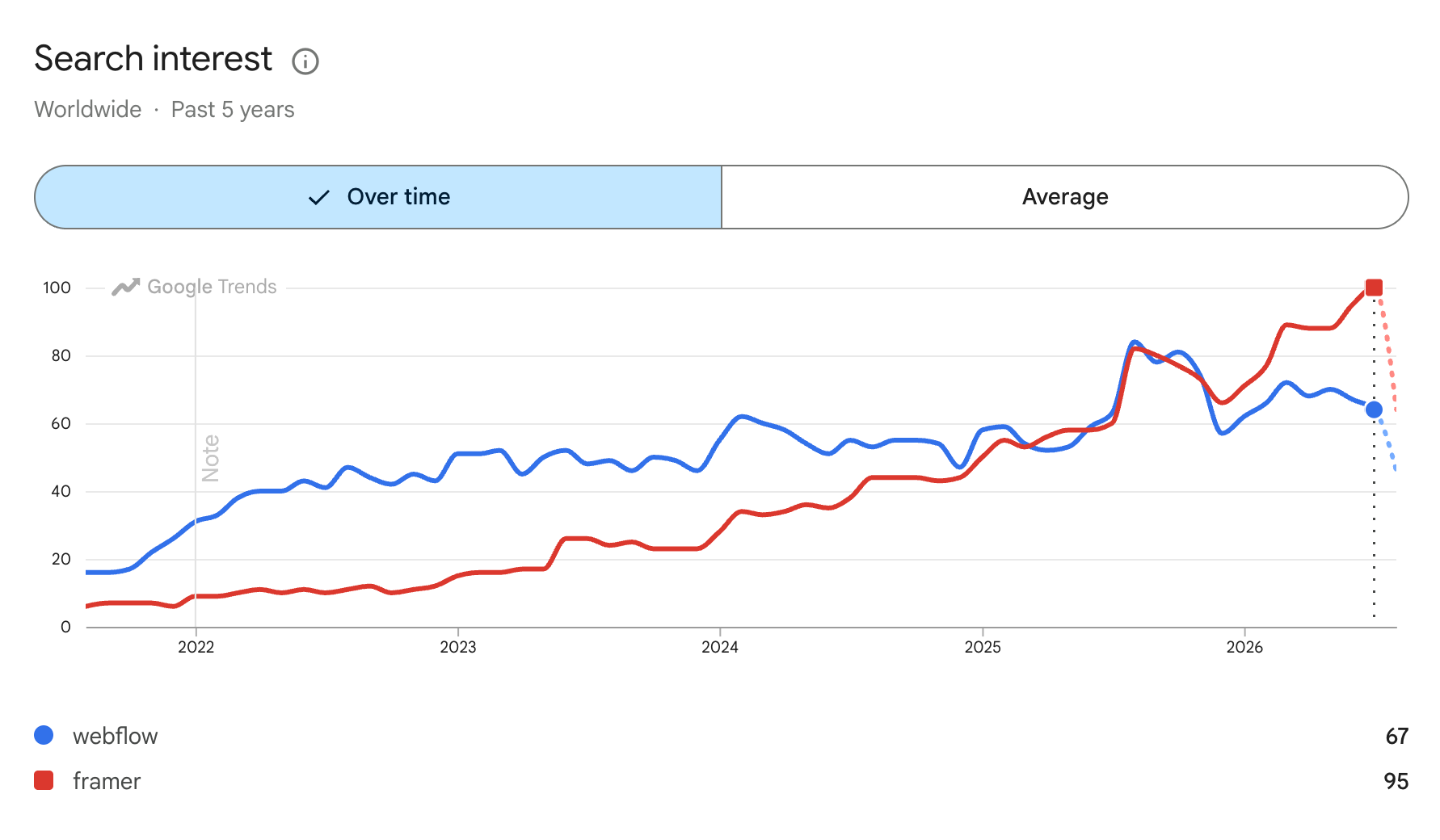
Data snapshot: Worldwide, past 5 years, pulled on Aug 6, 2026
With all of that being said, let’s be precise about what this metric actually tells you. Search interest is a proxy for curiosity and consideration, not installed base or revenue. It reflects where designers, developers, and marketers are directing their attention right now - largely driven by Framer’s aggressive product marketing, AI-assisted design tools, and startup mindshare. It does not mean Framer has more live production websites than Webflow, which the next section makes clear.
Installed Base: Webflow Still Runs Far More Live Production Sites
This is where the picture flips. According to BuiltWith’s tracking, Webflow powers roughly 670,000 live websites, with over 1.3 million sites having used it at some point historically.
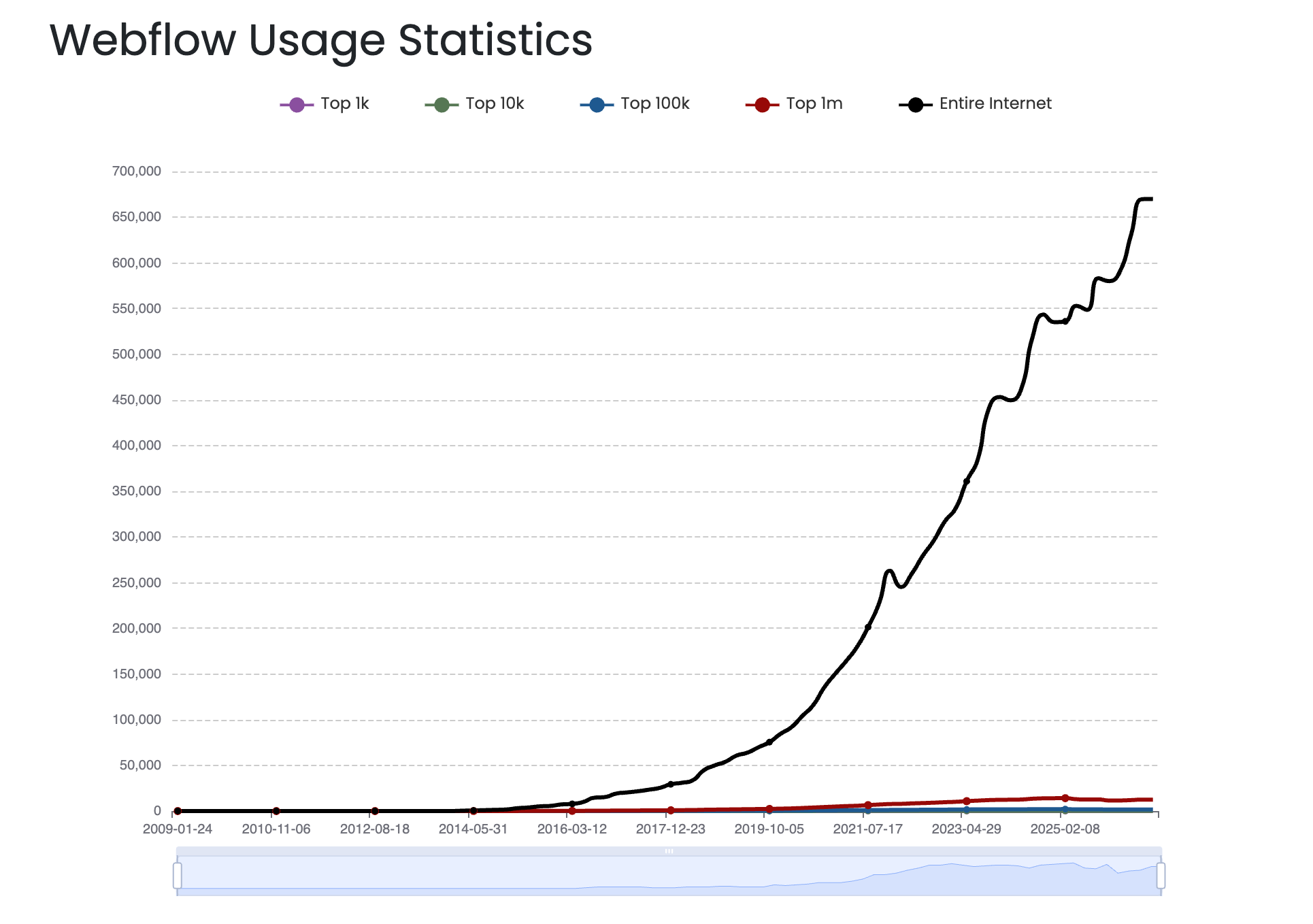
Data snapshot: Worldwide, all time, pulled on Aug 6, 2026
Framer sits at roughly 326,000 live sites out of about 409,000 total sites that have ever run it.
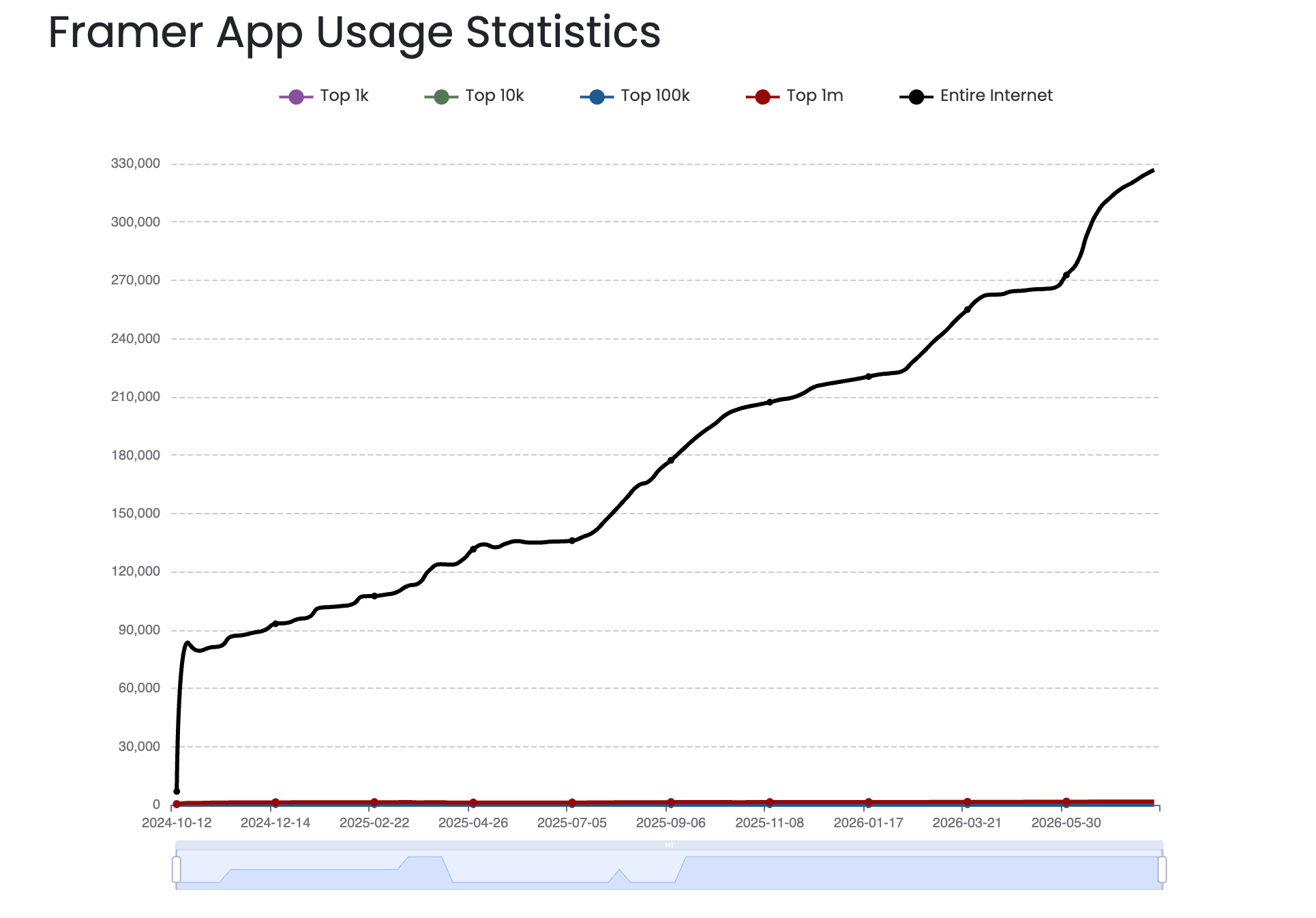
Data snapshot: Worldwide, all time, pulled on Aug 6, 2026
Put simply: Webflow’s live installed base is somewhere between two and five times Framer’s, even though Framer is growing faster in relative terms.
Company-size data reinforces where Framer actually lands today. Ramp’s vendor adoption tracking shows Framer’s highest usage among small-to-medium businesses (7%), dropping to 4% at mid-market and just 3% at enterprise.
Webflow’s company-size data points to a much broader fit across growing teams. Ramp’s vendor adoption tracking shows Webflow holding 20% adoption among SMBs and mid-market companies, with 17% in enterprise, which is far stronger and more evenly distributed than Framer’s smaller-company bias. That matters because Webflow is not just winning with design-led startups - it’s being adopted by the kind of marketing teams that need a site to scale with content, governance, and cross-functional workflows.
The pattern lines up with what we see in the market overall: Webflow has a larger live installed base, deeper CMS usage, and broader adoption across organizations that are past the “simple landing page” stage. In other words, Webflow is the platform that tends to stay in place as the website becomes a real growth engine rather than just a polished presence.
Market Share Trends: What W3Techs Shows
W3Techs measures market share differently than BuiltWith - it samples the top million or so ranked websites rather than every detectable install, so the percentages read lower and shift with crawl methodology. As of July 2026, Webflow is used by 1.2% of websites where the CMS is known, or 0.8% of all websites tracked. Framer sits at 0.3% of known-CMS websites, or 0.2% of all websites.
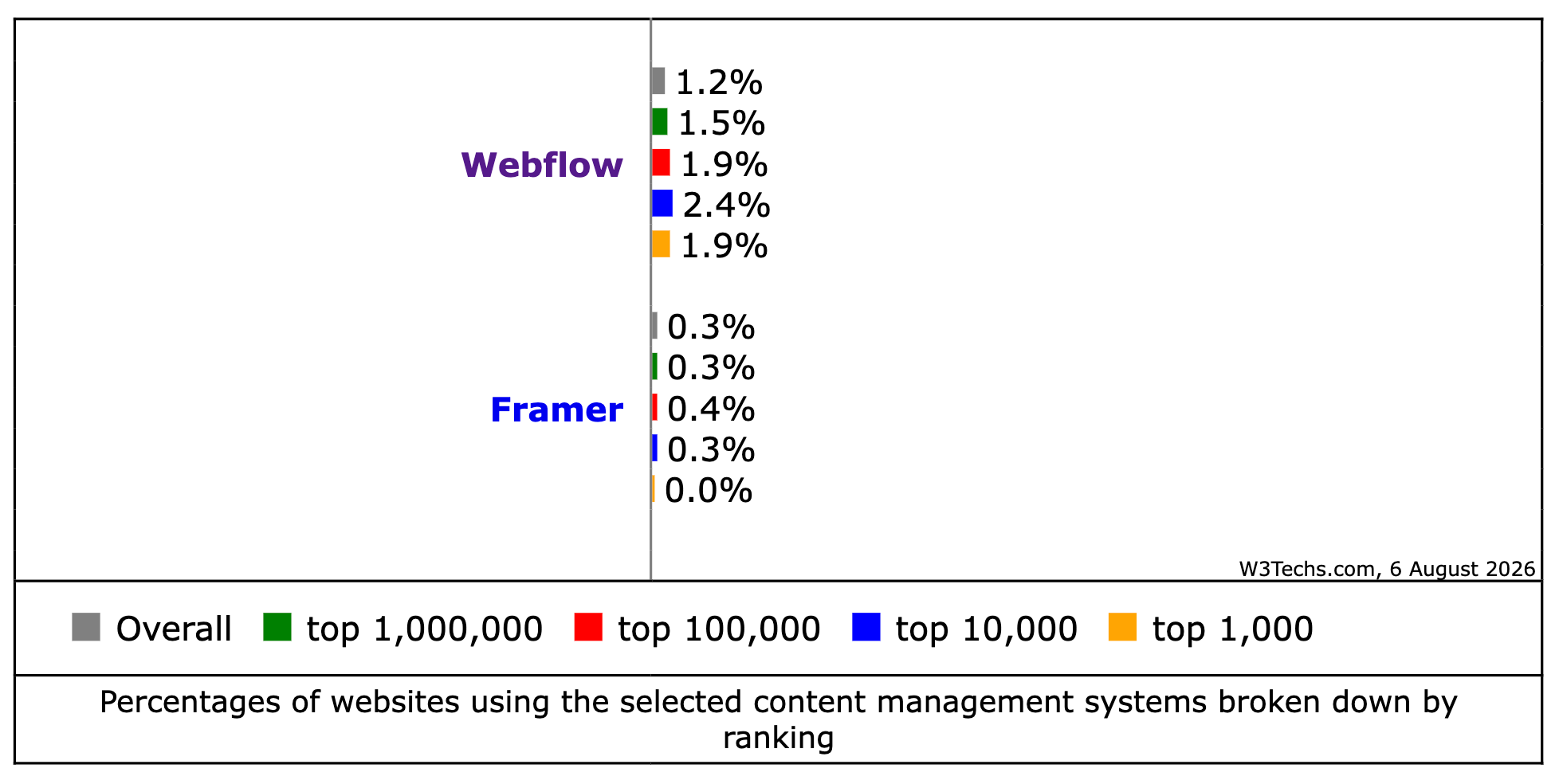
Data snapshot: Usage Webflow vs Framer, all time, pulled on Aug 6, 2026
Some 2026 crawl-based estimates push Webflow's share higher - one million-domain crawl puts it at 2.8% of websites, up from 0.6% in 2022, a 4.7x increase in four years. The exact number moves depending on sample size and methodology, but the directional story is consistent across every source: Webflow has a substantially larger footprint of live, ranked websites than Framer, even as Framer’s growth rate and search interest outpace it.
For context on the broader landscape both tools compete in, WordPress still commands roughly 60% of all CMS-identified websites, which is the market both no-code platforms are chipping away at from opposite ends - Webflow from the agency/mid-market side, Framer from the fast-shipping startup side.
Ease of Use: Framer Is Faster to Start, Webflow Rewards the Learning Curve
Framer’s core pitch is Figma-like simplicity - if you can use a design tool, you can build a site, and AI-assisted layout generation gets a page live in minutes. For a solo marketer or a two-person growth team needing a landing page fast, that speed is a genuine advantage.
Webflow trades some of that initial speed for structural control. It exposes a visual canvas that maps to actual HTML/CSS, which means there’s a steeper ramp for non-technical marketers but far more precision once you’re past the learning curve - critical for teams that need absolute control over complex, content-heavy layouts. Community consensus across independent reviewers is consistent: Framer for fast, visually-led launches and Webflow for teams building larger, longer-lived, structurally complex sites.
For a B2B SaaS marketing team, the practical question isn’t “which is easier on day one” - it’s “who's maintaining this site in 18 months?”
If your team will hand off CMS management to content writers, SEO specialists, and marketing people who aren’t designers, Webflow’s structured Collections and field-based content model tends to hold up better under multiple contributors than Framer’s more design-centric workflow.
Features: The Most Prominent Capabilities on Each Platform
Both platforms have expanded well beyond their original scope in 2026. Framer has evolved from a prototyping tool into a fast, design-led website platform with strong native analytics and AI-assisted building. Webflow has evolved from a visual CMS into a broader platform for serious marketing operations, adding localization, AI/AEO tooling, and Webflow Cloud for dynamic app experiences, API-driven workflows, and more complex web infrastructure under the same roof.
Framer’s Features
Framer’s strongest features remain design-centric: real-time visual editing that maps directly to production code, a component system built around reusable, prop-driven pieces, and native interactions and animations that don’t require plugins or custom code.
Framer Motion under the hood gives Framer sites some of the smoothest scroll and hover animations available in a no-code tool. Framer also ships built-in A/B testing and conversion analytics directly inside the platform, alongside Vectors 2.0 for in-app icon and graphic editing - features many competitors require third-party tools for.
Webflow’s Features
Webflow’s strongest features remain structural: the Designer’s direct HTML/CSS mapping gives developers and technical marketers precise control, the CMS Collections model supports reference and multi-reference relationships for genuinely relational content, and native Logic workflows let CMS updates trigger automations without external tools like Zapier.
Webflow also gives B2B SaaS marketing teams the operational guardrails they need at scale: localization for multi-region launches, granular permissions for cross-functional collaboration, staging and approval workflows, and Webflow Cloud for building dynamic product, marketing, and integration experiences without splitting the stack.
CMS Comparison: Where the Main Differences Are Showing
This is the single most important axis for a SaaS marketing team, because your blog, resource center, customer stories, and comparison pages all live in the CMS. In our own 2026 migration projects, CMS limitations are consistently the number one trigger for teams moving off Framer onto Webflow. This isn’t a knock on Framer’s CMS, which has genuinely improved over the years - but a recognition that platform-grade content operations need a depth Framer hasn’t fully built yet.
Both platforms ship a familiar CMS model at the surface level: you create a collection, define fields, add items, and bind them to templates. The basic primitives look similar in a demo. Where they diverge is in field types, reference relationships, item-scale limits, and operational tooling - and those four dimensions are what decide whether a CMS becomes an asset or a bottleneck as your content library grows.
Framer CMS in 2026: What Improved, What Didn’t
Framer’s CMS has materially improved since 2024. Field types are richer, the visual editing experience is smoother, and the publishing workflow is well integrated into the same canvas used for design. For teams running a blog under 100 posts, a small case study library, and a mostly flat content structure, Framer CMS handles the job well.
The current plan limits matter for planning purposes: the Basic plan caps at 100 items per collection, and the Pro plan caps at 1,000 items per collection. For most early-stage content operations, those limits are generous enough not to matter day one.
The structural gap that remains is the bigger issue for scaling teams. Framer has no native multi-reference field, meaning relating one collection to many items in another collection (let’s say for example tagging a blog post with multiple related case studies, or linking a resource to several product pages) requires manual workarounds rather than a native relationship. For a flat content structure, this never comes up. For a content engine with authors, categories, regions, and cross-linked related content, it becomes a real problem fast.
Webflow CMS in 2026: Why It Still Wins for Content Operations
Webflow CMS supports up to 10,000 items total across collections on the Business plan, with meaningfully higher caps at the Enterprise tier. The headline features remain reference and multi-reference fields, which let you build a genuinely normalized content model: posts that reference authors, authors that reference team pages, case studies that reference industries, products that reference categories. This relational structure is the foundation of any serious content operation, and it’s also what underpins programmatic SEO builds - one template, many data-driven pages, all properly interlinked.
In 2025 and 2026, Webflow shipped expanded API capabilities, native Logic for CMS-triggered automations, and conditional visibility rules on CMS-bound elements. These aren’t cosmetic additions - they’re the difference between a CMS your team can operate independently and one you have to fight or hire a developer to patch every time you need a new content relationship.
CMS Comparison Table
SEO: Both Can Rank, but the Depth of Control Differs
To be completely fair and objective, currently neither platform has an inherent ranking ceiling - sites on both platforms rank at the highest levels, and Google doesn’t penalize either tool by default. The difference shows up in technical depth and control at scale: sitemap handling, granular meta and schema controls, JSON-LD implementation, redirect management, and how each platform handles CMS-driven pages at volume.
Webflow generally offers deeper native controls for structured data, canonical tags, and bulk redirect management - useful when you’re running 100s of CMS-templated pages and need consistent technical hygiene across all of them. Framer has closed much of this gap and handles standard on-page SEO (titles, meta descriptions, basic schema, sitemaps) competently for smaller sites, but teams doing heavier technical SEO work like custom schema types, complex redirect logic, large XML sitemaps tend to hit Framer’s limitations faster than Webflow’s.
If your SEO roadmap includes programmatic pages, extensive internal linking architecture, or AI-search/GEO optimization work requiring granular structured data, Webflow’s technical depth gives your SEO team more to work with without needing custom code workarounds.
AI Features and AEO Visibility: The Comparison Most Articles Are Missing
This is the section most existing Webflow vs Framer comparisons skip entirely, mainly because it didn’t exist as a real product category until early-to-mid 2026. Answer Engine Optimization - making sure your brand is understood, trusted, and cited by ChatGPT, Claude, Gemini, Perplexity, etc. - has become a distinct feature set on both platforms, not just a marketing term. If you’re reading an older comparison, it probably doesn’t cover this, because both companies shipped their AEO tooling within the last year.
Framer’s AI Features
Framer’s 2026 AI surface is centered on generation and building speed rather than search visibility. Its AI agent (which absorbed the earlier standalone Wireframer tool) creates editable pages, sections, copy, and visuals directly from a prompt.
Workshop, Framer’s component-generation tool, turns plain-English descriptions into production-quality interactive components that inherit a project’s fonts and colors.
AI Translate handles multi-language site translation, and AI Plugins let teams connect third-party models from OpenAI, Anthropic, and Gemini.
What Framer doesn’t yet ship natively is a dedicated AI-visibility or answer-engine analytics product - its AI investment so far is about building sites faster, not measuring or improving how those sites get cited by AI engines.
Webflow’s AI and AEO Features
Webflow’s 2026 AI surface covers both generation and search visibility, and this is the more significant gap for SaaS marketing teams specifically. On the generation side, Webflow ships an AI Site Builder for prompt-to-site generation, an AI Assistant in the Designer for section generation and layout suggestions, AI Code Components for generating functional React elements from a description, and AI-assisted CMS content generation.
On the AEO side - the part completely new in 2026 - Webflow launched a closed-loop AEO system built around three steps: measuring how a brand shows up in AI answers via AEO analytics, generating prioritized recommendations through technical AEO agents (which flag missing schema, outdated metadata, and crawlability issues) and content optimization agents (which assess whether content reads as clear and authoritative enough to be cited), and then executing approved fixes directly from a centralized review panel.
This includes native llms.txt support, AI referral tracking, and sitewide audits for AI-readability issues - capabilities that represent one of the first fully productized AEO workflows built into a mainstream website platform, rather than a bolted-on third-party tool.
For a B2B SaaS marketing team, this matters because your buyers are increasingly researching vendors through AI assistants before they ever hit your site. A platform that can natively tell you whether ChatGPT or Perplexity is citing your product pages - and then fix the schema or structure gaps causing you to be missed - is solving a problem that didn’t have a mainstream tooling answer a year ago. Framer’s AI investment, strong as it is for building sites quickly, doesn’t yet address this layer.
Pricing: Framer Is Cheaper at Entry, Webflow Scales More Predictably for Teams
Pricing comparisons between the two are inconsistent across sources because both platforms have separate tiers for hosting, CMS limits, and team seats, and both change pricing periodically. Looking at current site plans (August, 2026), Framer’s top standard tier (Scale) runs around $100/month billed annually, while Webflow’s Business site plan runs around $39/month annually - though Webflow’s total cost typically includes a separate Workspace plan and add-ons like Localize, which Framer bundles more predictably into its own tiers.
The consistent theme across reviewers is that Framer tends to be more affordable for small sites and solo builders, while Webflow’s pricing scales in a way that’s more predictable for teams needing multiple CMS collections, staging environments, and multi-seat collaboration.
Free plans on both platforms come with real constraints: Framer’s free tier carries a Framer subdomain and watermark, while Webflow’s free tier is limited to a webflow.io subdomain, two pages, and just 50 CMS items - usable for prototyping, not for a real marketing site.
The real cost comparison is not the sticker price - it’s total cost of ownership. Framer can look cheaper upfront, while Webflow often looks more expensive because pricing is spread across site plans, workspace seats, and add-ons. But for B2B SaaS teams, the meaningful costs usually come later: extra seats, CMS growth, workflow friction, developer dependency, and the SEO and migration cost of replatforming once the site outgrows its original content model. A platform that costs less to launch can still cost more to operate if it creates bottlenecks or forces a rebuild once the site starts scaling.
Where Each Tool Actually Wins for a B2B SaaS Marketing Team
What We Can Pull From This Comparison
Framer’s search interest surge reflects real product momentum and a genuinely fast, enjoyable design workflow - and it’s a legitimate choice if your site is small, your team is lean, and speed to launch matters more than long-term content architecture. But the adoption data tells a different story than the search trend: Framer’s actual usage still leans mostly toward SMBs and design-led teams, while Webflow retains a larger footprint among the mid-market and enterprise organizations that look more like a scaling B2B SaaS company.
If your marketing team’s roadmap includes a growing content library, technical SEO investment, programmatic pages, AI-search visibility as a measured channel, or handoff across multiple non-design contributors, Webflow’s CMS depth, structured data controls, and native AEO tooling are built for that trajectory. If you’re standing up a fast, small, visually distinctive site and don’t yet need that infrastructure, Framer will get you there faster - just go in aware of where its ceiling currently sits, both in the CMS and in AI-visibility tooling.
Frequently Asked Questions
Webflow is usually better once the site needs a serious CMS, SEO structure, and multi-contributor workflows, while Framer is stronger for fast, design-led launches.
Yes, Framer is generally faster for non-technical teams to learn, while Webflow has a steeper learning curve but offers more control as the site scales.
Webflow is the stronger CMS choice for B2B SaaS teams because it handles relational content, templates, and larger content operations more cleanly.
Webflow is the better option if SEO and AI/AEO visibility matter, because it offers deeper technical controls and native AEO tooling.
It can work for smaller content libraries, but Webflow is the safer long-term choice once the blog, case study library, or taxonomy starts growing.
Framer can look cheaper upfront, but Webflow often has lower long-term cost if the team wants to avoid migrating platforms and CMS workarounds later.
Framer makes sense when speed, visual polish, and simple publishing matter more than CMS depth, technical SEO, or enterprise-style content operations.