

Schema Markup for B2B SaaS in Webflow: Building Entity Graphs for AI Search
- Most B2B SaaS sites need five schema types: Organization, Person, Article, SoftwareApplication (or Product) and BreadcrumbList. Add FAQPage only where real Q&A is on the page.
- Use JSON-LD, added at template level and connected to CMS fields, so it stays in sync as you publish.
- Webflow adds some baseline structured data, but not the author, product and company connections a SaaS site needs.
- Schema must match what’s visible on the page. Fake reviews, or FAQs that aren’t shown, hurt more than they help.
- Schema won’t fix weak content or rankings, but it was the strongest on-page predictor of AI citation in a 2026 study.
- Re-check schema whenever a template or CMS field changes. That’s when it quietly breaks.
Most B2B SaaS sites on Webflow need five schema types: Organization, Person, SoftwareApplication (or Product), Article and BreadcrumbList. Add them once per template, connect them to CMS fields, and validate every template after changes. Schema won’t fix weak content, but it makes your company, product and authors easier for Google and AI engines to identify.
Below: which types to add, how to add them in Webflow, a copy-paste JSON-LD example, and the mistakes we see most often on SaaS sites.
What Is Schema Markup?
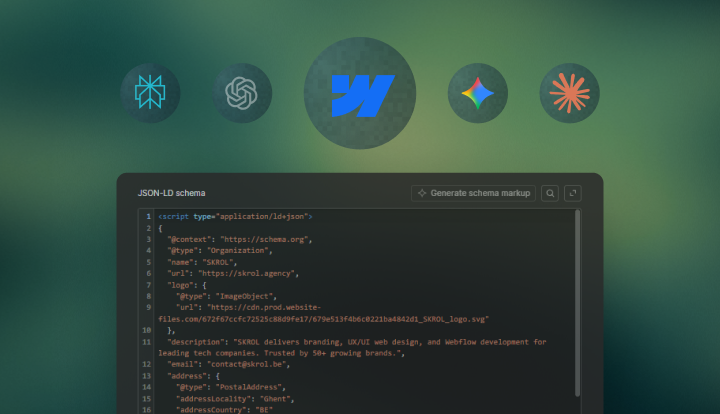
Schema markup is structured data, usually a JSON-LD block, that tells search engines and AI systems what a page is and which entities it describes: the company, the product, the author, the article. It uses Schema.org, a shared vocabulary that Google, Bing, Yahoo and Yandex launched in 2011.
The visible page is still the source of truth. Schema only clarifies what the page already says. If the markup claims something the page doesn’t show (reviews, FAQs, product features), it weakens trust instead of helping.
For SaaS sites this matters more than for most, because they’re full of entities: company, product, features, plans, integrations, use cases, authors and customers. Without schema, search engines and AI tools have to guess how those connect. With it, they get a clean map.
Does Webflow Add Schema Markup Automatically?
Partly. Webflow adds some baseline structured data on static pages, so you don’t start from zero. But it doesn’t add the parts a SaaS site needs most: article markup tied to real authors, product or software markup, FAQ markup, and consistent company data across every template.
Webflow’s AI tools can also suggest schema. Check every suggestion before you publish: AI-generated schema can include fake reviews, invalid types or values that aren’t on the page.
How Do You Validate Schema Safely?
Compare the visible page with the JSON-LD, field by field: title, author, dates, company name, FAQs, product claims and reviews. If a value isn’t visible on the page, it shouldn’t be in the schema. Start with blog templates, product pages and author pages, because errors there spread across the whole CMS.
Then:
- Validate the live URL to make sure the schema is actually present on the published page.
- Inspect the rendered page and confirm every schema field matches visible content.
- Compare the JSON-LD output against the page for author, dates, organization, FAQs, and any product claims.
- Remove anything unsupported, especially fabricated reviews, fake ratings, or invalid schema types.
- Recheck the schema after any template, CMS field, or content update so it stays aligned over time.
Where Does Webflow Stop Helping?
At the hard part: deciding which entities matter and connecting them to your CMS. Webflow doesn’t know your author model, your product structure or which fields should feed which schema properties. So most SaaS sites either stop at the baseline or paste one-off snippets into page settings. The result is usually:
- One article has author data, another does not
- The organization schema is incomplete
- The FAQPage block exists on one page but not the template
- The product page lacks a coherent relationship to the company entity
- None of it is reviewed when the CMS evolves
Good schema in Webflow is about the system, not the amount of code: which pages get which types, which CMS fields feed which properties, and which values are managed in one place.
Which Schema Types Does a B2B SaaS Site Need?
Six types do most of the work. Use the most specific type that fits, and only where the page actually shows that content:
| Schema type | Where it usually belongs | Why it matters |
|---|---|---|
| Organization | Homepage or site-wide brand layer | Defines the company entity, logo, website relationship, and key identity signals |
| Person | Author pages or embedded in article markup | Reinforces authorship, expertise, and links a real author to real content |
| Article or BlogPosting | Blog posts, guides, research pieces | Clarifies editorial content type, headline, author, publisher, dates, and canonical page relationship |
| FAQPage | Pages with visible, real Q&A blocks | Helps machines parse compact question-answer units even though Google no longer shows FAQ rich results in Search |
| Product or SoftwareApplication | Product pages, key solution pages, sometimes pricing architecture | Clarifies what the software is, who publishes it, and which core properties or offers are associated with it |
| BreadcrumbList | Pages with visible breadcrumb navigation | Helps reinforce page hierarchy and content relationships within larger site structures |
The list is short on purpose. Marking up everything you can is worse than marking up the right things accurately.
Is JSON-LD Still the Right Format?
Yes. Google still recommends JSON-LD as the easiest format to implement and maintain. In Webflow it’s also the most practical: you can build it from CMS fields, keep it separate from the visible design, and connect several entities (article, author, company) in one block.
What Is an Entity Graph?
It’s the consistent picture of your company that search engines and AI tools build from your schema. The company on the homepage is the same one publishing the blog, the product on the pricing page is the same one in the docs, and the author is a real person connected to the company.
For a SaaS site that covers education, solutions, features, customer proof and integrations, that consistency tells machines what you’re an authority on.
In Webflow, it usually looks like this:
- The homepage reinforces the Organization as the central entity.
- Product or platform pages reinforce the SoftwareApplication or Product entity and its relationship to the Organization.
- Blog articles reinforce Article or BlogPosting, connected to a real Person author and the same Organization publisher.
- FAQ blocks reinforce recurring buyer questions as visible, extractable content, optionally mirrored in FAQPage schema when the page genuinely contains those questions and answers.
- Breadcrumbs reinforce where each page sits in the wider knowledge structure.
None of this is exotic. The difference between a weak and a strong entity graph is usually consistency, not advanced schema types.
What Can Marketing Control Without Code?
More than most teams think. Once the setup is in place, schema quality mostly depends on content habits. Marketing controls:
- Whether author names, bios, and URLs are real and consistently maintained.
- Whether article headlines, summaries, dates, and canonical relationships are clean and stable.
- Whether FAQs on the page are genuine buyer questions with visible answers rather than filler added just for markup.
- Whether product, feature, and integration pages use consistent naming across the site.
- Whether CMS fields are structured well enough to support clean JSON-LD output instead of forcing manual fixes later.
If the CMS is messy, the schema will be messy too. Good schema starts with good content structure.
What Still Needs a Developer?
The initial setup: generating JSON-LD from CMS fields, connecting multiple entities, conditional output per template, and checks that catch breakage when templates change. Typical cases:
- Dynamic blog or CMS templates where field mapping needs to be exact.
- Product or software pages that require richer property sets.
- Multi-author editorial systems with author pages and reusable author entities.
- International or multilingual implementations where repeated entity references need to stay coherent across locales.
- Sites with frequent template updates, where schema can silently break when a field name or output condition changes.
Set the framework up properly once, and marketing can run it from there.
What Does Google Require for Structured Data?
Use a supported format, put the markup on the page it describes, include required properties, don’t block the page, keep data current, and never mark up content that’s misleading or not visible.
Most problems aren’t technical. They’re trust failures: reviews that don’t exist, FAQ answers that don’t match the page, a broken logo URL, or an author who only exists in the schema. Accuracy beats ambition.
What changed in 2026 is what schema gets you visually. Google stopped showing FAQ rich results on May 7, 2026 (Google Search Central), and HowTo rich results were retired in 2023. So use FAQPage only where real Q&A is on the page, and skip HowTo.
What Are the Most Common Schema Mistakes on Webflow Sites?
These six, and none of them are technical:
- Relying entirely on the automatic baseline and assuming the site is therefore fully covered.
- Using AI-generated schema without checking whether the values actually exist on the page.
- Marking up fake reviews, ratings, or FAQs that were never visible to users.
- Forgetting to update structured data when CMS templates or field names change.
- Using disconnected one-off snippets instead of a consistent template system.
- Ignoring author and organization identity consistency across blog content.
They’re process problems. Check schema as part of publishing and template QA, not just on launch day.
How Do You Add Schema Markup in Webflow?
Seven steps, set up once per template:
1. Define the core entities first: organization, product or platform, authors, and key content types.
This is the foundation of the whole system, because schema only works well when it reflects the actual entities the site is trying to communicate.
2. Map which page templates need which schema types.
A homepage, product page, article template, FAQ section, and author page do not all need the same markup, so the schema layer should follow the template structure.
3. Map CMS fields to the properties those templates need to output dynamically.
This is where Webflow becomes practical for marketing teams: the schema can pull from the same fields that already power the page content, which keeps the visible page and the structured data aligned.
4. Implement JSON-LD at the template level rather than page by page wherever possible.
In Webflow, paste the JSON-LD into the CMS template’s Page Settings → Custom Code (inside the head tag) and insert CMS fields with “+ Add Field”. One block then covers every post in that collection.
5. Check the output with a real Article example.
Open one live post, view its source, and check that every value in the JSON-LD (title, author, dates, image) matches what’s on the page. The example below shows what a correct Article block looks like.
6. Validate every live URL with Google’s Rich Results Test and a Schema validator before rollout.
That makes sure the markup is actually readable, valid, and aligned with the visible page instead of just looking correct in the code editor.
7. Re-test after template changes, CMS migrations, or meaningful content model revisions.
Schema should be treated as part of the content system, not a one-time setup, because the moment the CMS changes, the structured data can drift too.
Here’s an Article example for a blog template. In Webflow, the values in brackets come from CMS fields, so one block works for every post:
<script type="application/ld+json">
{
"@context": "https://schema.org",
"@type": "Article",
"headline": "[CMS: Post title]",
"description": "[CMS: Meta description]",
"image": "[CMS: Main image URL]",
"datePublished": "[CMS: Published date]",
"dateModified": "[CMS: Last updated date]",
"author": {
"@type": "Person",
"name": "[CMS: Author name]",
"url": "[CMS: Author page URL]"
},
"publisher": {
"@type": "Organization",
"name": "SKROL",
"logo": {
"@type": "ImageObject",
"url": "https://www.skrol.agency/[logo-file].png"
}
},
"mainEntityOfPage": {
"@type": "WebPage",
"@id": "https://www.skrol.agency/blog/[CMS: Slug]"
}
}
</script>
What Does Schema Look Like on a B2B SaaS Site?
Four common page types:
Example 1: A Blog Article Template
A long-form article page should usually output Article or BlogPosting markup with headline, description, image, datePublished, dateModified, author, publisher, and mainEntityOfPage tied to the canonical URL. If the site has a real author page, the author should be a Person with a real URL, not just a text string.
Example 2: A Product or Platform Page
A product page can use Product or SoftwareApplication markup where the page genuinely describes the software itself. The goal is not to overcomplicate the page with every possible property, but to reinforce what the software is, who publishes it, and which core properties are actually visible to users.
Example 3: An FAQ Section on a Solution Page
If the page contains real, visible buyer questions and answers, a FAQPage block can still be appropriate as a machine-readable reinforcement layer, even though Google no longer surfaces classic FAQ rich results in Search. The key rule is that the answers in the markup must match the visible answers on the page closely and truthfully.
Example 4: A Broader Content Hub
A CMS-driven resource hub with guides, comparison pages, and use case pages benefits from consistent article markup, breadcrumb hierarchy, stable organization references, and a reusable author model. The more templates and entities the hub contains, the more valuable that consistency becomes.
Think About Schema and Content Together
Schema works best on pages that are already clear: a precise H1, an answer-first opening, clean headings, a real author and date, and data next to the claims it supports. It reinforces good structure, but it can’t replace it.
Does Schema Markup Help With AI Search?
Yes, but it won’t get you cited on its own. An April 2026 analysis of 100,000+ AI citations (AI+Automation, “The SEO Floor”) found ranking position was the biggest factor. Among on-page factors, schema was the strongest predictor (odds ratio 1.31). So schema helps most on pages that already rank and answer the question well.
Where teams go wrong is overreacting. Avoid these:
- Do not invent entities that are not real on the site.
- Do not add FAQ schema to pages without real FAQ content.
- Do not leave outdated dateModified or stale author information across hundreds of CMS pages.
- Do not assume Webflow’s baseline output is enough for a scaled SaaS content program.
- Do not let schema drift outside the content model just because it validated once at launch.
What works is the boring approach: accurate markup, clear structure, strong content and regular checks. For the page-structure side, see how to structure blog posts for AI citation.
How Do You Audit Your Current Schema Setup?
Answer these six questions:
- Does the homepage clearly reinforce the organization entity?
- Do product and platform pages consistently describe the software entity?
- Do editorial templates output complete article markup with real authors and dates?
- Do author pages exist and support person-level identity rather than anonymous bylines?
- Do visible FAQ blocks, breadcrumbs, and canonical relationships align with the schema?
- Is everything validated on live URLs, not just in staging snippets?
If the answer to several of those is no, the site doesn’t need more random schema types. It needs a cleaner system.
How to Treat Schema Markup in 2026
Schema in Webflow isn’t a snippet you paste once. It’s part of how your content system works: which entities matter, which templates express them, which CMS fields feed them, and who keeps it accurate. Built well, it makes your company, product and authors easier for Google and AI tools to understand and trust.
Want it set up properly across your templates? Our Webflow SEO and GEO services include schema design and validation.
Frequently Asked Questions
Schema markup in Webflow is structured data, usually implemented as JSON-LD, that helps search engines and AI systems understand what a page is about and which entities it describes.
Partly. Webflow adds some baseline structured data on static pages, but SaaS sites still need custom schema for articles, authors, products, FAQs and company data.
Yes. Google still recommends JSON-LD because it’s easier to implement and maintain, and it is the most practical format for dynamic Webflow implementations.
Yes, but indirectly. It helps machines understand your pages and entities, which supports AI citation when the page already ranks and answers the question well.
Organization, Person, Article (or BlogPosting), SoftwareApplication (or Product), BreadcrumbList, and FAQPage where real Q&A is on the page.